

Towering demand for laptops or notebooks has made the electronic market widely popular like never before. It is yet another alternative for desktop PC. The exclusive design makes it small, lightweight and easily portable. When at home, you can conveniently carry the laptop to different rooms. It is your companion when traveling or outdoors. Given below are few tips for buying the right laptop!
How do I choose my Laptop?
Basically, a laptop should be selected based on its features and portability. Benefits of using a laptop are entirely dependent on specific needs of users. Generally, it is easily transportable anywhere and any time. Also, this user-friendly device’s price varies according to its features. We have categorized the users, outlining the type of laptops that will suit them.
Home users – For people, who surf the Internet occasionally, a portable laptop with similar features of a desktop PC is a great choice. Home users can look out for either midsize or desktop replacements with 800 MHz processor and 256MB RAM. They are budget-friendly and also offer added features.
Students – Students will prefer a lightweight laptop that can be easily carried from classroom to library. For such users, a thin-and-light or an ultraportable laptop with 256MB RAM, a burner and Pentium M processor is the right choice.
Regular Fliers – Frequent travelers prefer a lightweight laptop whether at airport or in meetings. The smallest and lightest ultraportables with processors in the Pentium-M family, built-in Wi-Fi, 256MB RAM is the right choice.
Business power users – Such users who attend seminars or prepare presentations, a thin-and-light or desktop replacement laptops are appropriate. Powered with 256MB RAM, 40GB hard drive space and an Ethernet card, this is the right kind of laptop that serves all business needs.
Multimedia Author or Gamer – Such users involve in editing audio, video or photos using Photoshop. A desktop replacement with 512MB RAM, a 2GHz or faster processor and 80GB hard drive space is the right choice.
What are the types of laptops available in the market?
Technology has enabled the availability of laptops in various shapes and sizes. Keeping buyer’s perspective in mind, given below are few kinds of laptops.
Ultra portable – These compact laptops mainly suit mobile professionals or frequent business travelers. The smallest of all, it weighs less than 6 pounds with screen size of less than 12 inches.
Thin & light – It is apt for those who mainly consider performance, features and price. This easily portable laptop is great for occasional fliers. It weighs less than 4 pounds with screen size of 12 or 14 inches.
Midsize – Suitable for home and small business users, a midsize comprises of basic computing software that facilitates word processing, storing digital photos, burning CDs, online communication and so on. It weighs up to 8 pounds with screen size of 15 to15.5 inches.
Desktop replacement – Usually, this laptop is used at home and is great for business users. It delivers exclusive computing muscle for serious gaming, multimedia authoring and high-level digital audio/video work. It weighs up to 8 pounds with screen size of 17 inches.
Tablet PC – Such laptops are widely popular for their portability, flexibility and unique features. They allow you to take handwritten notes and navigation through menus, documents and web pages in various styles.
How do I pick a suitable laptop processor?
Generally, processors found in laptops are AMD or Intel made. When others focus on processors’ performance, few consider their battery. With minimal power requirement, laptop processor generates lesser heat than desktop processor. It basically extends battery life and prevents excess heat. For beginners a 2.0GHz Pentium 4-M, 1.7 GHz Celeron-M, or 2200+ Athlon XP Mobile are recommended.
Key features be considered while buying a laptop Laptops with bewildering features tend to confuse you. Once you have decided on its weight & processor, consider other components. Few important ones to be kept in mind while buying are listed below:
Hard drive – This stores all your programs and files. Higher the drive’s storage capacity, more is the data storage. The speed may vary depending on the capacity of the drive. If planning to store operating system, documents or photos, look out for a 20GB or 40GB hard drive. Laptop with 80GB hard drive is suggested for saving large quantity of files like high-resolution images or movies.
Memory (RAM) – Usually, a certain amount of memory (RAM) is required to run programs including operating systems. Look for a laptop with 256MB, 512MB RAM, 1GB RAM or more.
CD & DVD drives – Most laptops have an inbuilt CD/RW, DVD or external Drive. They are connected through USB that is meant for burning disks and watching movies. There are combo drives that read or write to 2 media formats.
Ports – Ensure that all peripherals and gadgets can be well connected with your laptop. A USB 2.0 or FireWire is required to connect MP3 player, digital camera or camcorder. Most of the devices also work with USB 1.1.
Screens – People who choose a lightweight laptop tend to compromise with the display. Laptop with larger display is suggested for those interested in multimedia or 3D games.
Networking & Wi-Fi – Connecting to Internet is easy with laptop featuring built-in Ethernet support, a PCMCIA network interface card, or Wi-Fi (802.11b or 802.11g) support.
Graphic Card – It processes video by freeing up memory (RAM) for other system operations.
What other accessories should I concentrate on?
Given below are the major accessories to be considered when buying a laptop.
Mouse option – Generally, laptops do not feature a traditional mouse but there could be a mouse option. Nowadays, all laptops come with a touchpad, nub or both.
Bluetooth – It is a short-range wireless networking technology that is supported by some laptops. A bluetooth-enabled PDA or cell phone will allow you to talk and exchange data wireless.
Extra Battery – If you are entirely dependent on battery, ensure that you have a spare that can be carried along.
Docking Station – With this, you can connect your laptop to a standard keyboard, mouse, monitor & printer.
Carrying Case – It is always advisable to have a laptop carrying case for safe and convenient transport purpose.
Article Directory: http://www.articledashboard.com


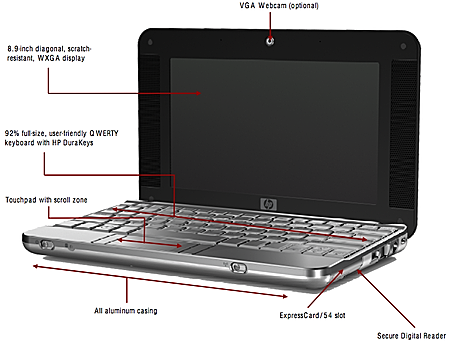


 The waiting Eee PC with a bigger screen is almost over A large increase from the previous version to make this sub-notebook again a favorite, despite the high price REGARDLESS OF the amount of sales to reach 1 million units of the Eee PC was released after five months, re-released the ASUS successor generation Eee PC, ASUS Eee PC 900. New generation of These sub-notebooks include the big screen 8.9 inch, a 1.3 megapixel webcam, innovation latest FingerGlide, and 12 GB capacity storage for users of Windows and 20 GB for the Linux platform. ASUS Eee PC 900 (U.S. $ 499) still retain the concept of "Easy to learn, work and play" to maintain the weight of the ASUS Eee PC 900 under 1 kg. Ease of use is a factor The main success of the ASUS Eee PC.


